Typing at work
Typing speed for work: setting useful goals for your job
Plan typing practice for office work, coding, data entry, and customer support. Match the task and scoring to actual job requirements.
A job title does not describe one typing task. A receptionist may copy names, write messages and move between forms. A developer may spend longer reading code than entering it. A support agent may need to write a clear explanation while checking an account. Instead of applying one WPM target to every occupation, identify the actual work, any published assessment requirement and the kinds of errors that matter.
Published job thresholds with an actual assessment method
The U.S. Office of Personnel Management publishes the requirements below for specified federal clerical duties. They are qualification thresholds for covered applicants, not measured occupational averages; no study sample size applies. Check the actual vacancy and assessment instructions before relying on any requirement. [OPM, Clerical and Administrative Support proficiency requirements]
Each listed typing threshold uses a five-minute sample with three or fewer errors under the OPM standard. Meeting a Typido practice score alone does not certify that you passed an employer-administered assessment. The agency controls its accepted evidence and any other qualification requirements. [OPM proficiency requirements, typing footnote 1]
Scroll the table horizontally to read the methods and sources.
| Covered role or duties | Required typing speed | Population and assessment method | Source |
|---|---|---|---|
| Clerk-Typist GS-2/4; Office Automation Clerk/Assistant and covered Typing/Office Automation titles | 40 WPM | Covered OPM applicants; five-minute typing sample, three or fewer errors. Requirement, not a sampled mean. | OPM proficiency requirements and footnote 1 |
| GS-2 transcription duties, typing alternative | 20 WPM | Covered OPM transcription applicants; five-minute sample, three or fewer errors. Requirement, not a sampled mean. | OPM Data Transcriber requirements and footnote 1 |
| GS-3/4 transcription duties, typing alternative | 25 WPM | Covered OPM transcription applicants; five-minute sample, three or fewer errors. Requirement, not a sampled mean. | OPM Data Transcriber requirements and footnote 1 |
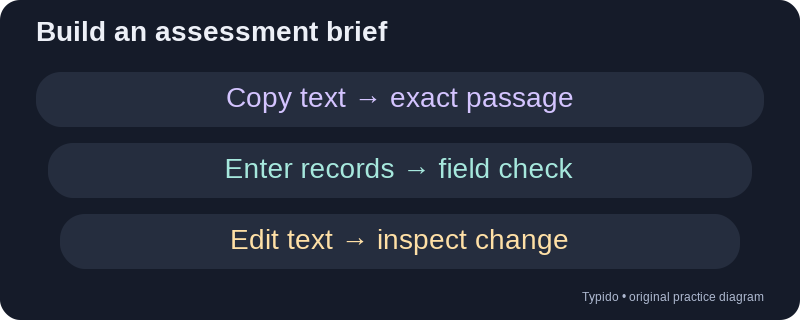
Build an assessment brief
- Get the written rules. Record the vacancy, duration, error rule and accepted evidence.
- Match the task. Choose copying, record entry, dictation or editing from the instructions.
- Rehearse the method. Use fresh fictional text and the specified correction rules.
- Resolve missing details. Ask the recruiting contact before treating a practice score as qualifying evidence.
Separate a hiring requirement from an average
If an employer specifies a typing assessment, read its instructions directly. Check duration, permitted corrections, language, accuracy rules and whether a certificate must come from a particular provider. A practice website result does not automatically satisfy those conditions. Keep a copy of the current job description and ask the employer about unclear requirements. Do not assume that a score from an unrelated online article is the employer’s pass mark.
An occupational average, a recruitment threshold and your own working pace answer different questions. The first describes a sample, the second is a selection rule and the third reflects the job you actually do. A practical goal connects a measurable typing skill with a real task you need to complete accurately.
Clerical copying: practice the passage and the correction rule
For a copying assessment, first determine whether you must reproduce displayed text exactly. Look for instructions about capitals, punctuation, paragraph breaks and corrections. In your practice document, choose an unfamiliar passage rather than a paragraph you can recite. Copy it once at a comfortable pace, then compare the finished text with the source. Note whether your errors came from locating keys, losing your place or skipping small details such as a comma. Those problems call for different drills.
Create a fictional office notice with a meeting location, a time and an action. Practice copying it without changing its wording. On a separate attempt, use a new notice with similar complexity. Keep the timer and correction method consistent when comparing the attempts. If the employer specifies a format that Typido does not reproduce, use Typido for keyboard fluency and practice the exact format in an appropriate separate environment. A practice result is useful preparation without being an official certificate.
Office writing needs clear sentences and dependable editing
For email, reports and meeting notes, separate copying from composition. Copying a displayed sentence tests transcription. Writing an explanation also involves deciding what to say, checking facts and organizing the message. A lower apparent WPM while composing does not mean your fingers have become slower. Use a short copying test to track keyboard fluency, and evaluate the usefulness of the finished message separately.
Create a fictional office note containing a date, a name and one request. Type it in a blank document, then proofread those details. Repeat with a different note rather than the same memorized paragraph. Pay attention to capitals, punctuation and navigation while editing. A useful improvement might be entering the correct date on the first attempt or moving back to a missing word efficiently, even when the total time changes very little.
Data entry rewards field-level accuracy
A transposed digit in a reference number can be more consequential than a small difference in prose speed. Practice using made-up records with a consistent format: a short identifier, a date and an amount. Check one field at a time before moving to the next. Decide whether you will use the number row or a number pad and keep that choice stable while evaluating the exercise. They involve different hand movements.
Use invented examples such as reference AB-4826, date 14/11/2026 and amount 127.40. These are practice values, not customer records. Compare the copied record with its source and mark substitutions, omissions and transpositions separately. Do not paste real patient, customer, banking or employee information into a typing exercise. If your workplace provides an approved training environment, use its rules and data-handling policy for realistic workflow practice.
Build a tiny set of invented records containing an identifier, an amount and a date. Decide in advance which field you will enter first and when you will check it. Copy a complete record, compare each field with its source and mark the location of an error. Distinguish a wrong digit from a digit placed in the wrong field. Both matter to the finished record, but repeating a prose test may do little to reveal the second problem.
Keep the sample deliberately fictional: reference TX-6842, amount 208.35 and delivery note “rear desk” are sufficient for an exercise. Preserve leading zeros when the source contains them. Do not transform the exercise into a calculation unless that is part of the actual assessment. Record whether you used the number row or a separate pad. When the movement between fields is the difficulty, rehearse the same field order slowly, then change the records so you are copying rather than remembering them.
Reference: TX-6842
Amount: 208.35
Delivery note: rear desk
Check: identifier, decimal position, field placement
Coding and technical work need punctuation control
Prose WPM says little about how reliably you can enter brackets, underscores, indentation and case-sensitive identifiers. For coding practice, select a small expression you understand and copy it exactly. Then inspect the punctuation before thinking about speed. You do not need to run the code to practice its characters. A missing closing bracket and a misspelled variable are different problems, and each suggests a more focused drill.
Try a short fictional line such as “const itemCount = records.length;” in a plain text editor. Change the identifier and write a second line with parentheses. Note whether the interruption comes from finding a symbol, reaching for Shift or remembering the expression. Practice only the movement you identified. Use Typido’s coding guidance and Symbol mode for related keyboard work, while keeping actual software review and debugging separate from a typing score.
Support work combines reading, decisions and replies
A timed stream of words is different from responding to a person. Customer support often requires reading a question, finding relevant information and writing a respectful answer. Typing fluency can make entering that answer easier, but a speed target should not encourage sending an unchecked response. Practice with fictional situations and evaluate whether the reply answers the question, includes the necessary next step and avoids unsupported promises.
For example, invent a request to change a delivery date. Draft a response that acknowledges the request and explains what information is needed. Proofread names, dates and any condition that affects the answer. Next, copy a short unfamiliar paragraph to isolate keyboard performance from composition. Keeping those exercises separate prevents a misleading conclusion that every pause during real work is a typing defect. Some pauses are necessary thinking and checking.
Build a work-specific practice record
Choose one repeatable transcription test and one safe simulation of your everyday task. Record the test duration, WPM and accuracy, then record a task observation such as “missed the decimal separator” or “needed to look down for the closing bracket.” A weekly review can then identify what to practice. Avoid converting a few minutes saved in an exercise into an unsupported claim about hours of workplace productivity or financial return.
Keep practice short enough that you can still review the work carefully. If you share a device, check the active keyboard layout and clear fictional exercise text when finished. Use your employer’s approved tools for sensitive work. A Typido practice result can inform your personal learning plan; it is not an employment certificate, an assessment of professional competence or proof that you meet an employer’s current test conditions.
Common questions
What WPM does my profession require?
Check the actual job or assessment specification. Roles vary, and task-specific accuracy can matter more than a general prose score. This article does not present unsupported occupational averages as universal requirements.
Can I practice with my real work documents?
Use fictional or explicitly approved training material. Do not enter confidential or personal records into public practice tools. A realistic format can be recreated without using real customer or employee information.