Accuracy exercises
Practice typing numbers and punctuation accurately
Practice number-row reaches, Shift, decimal separators, and proofreading with fictional dates, amounts, identifiers, and sentences.
An easy word test can feel smooth until a date, amount or question mark appears. Those characters change the movement pattern and often require a layout check or a Shift transition. Practice them as part of meaningful text instead of treating all punctuation as one vague weakness. This guide provides original, fictional examples that can be copied into a blank document and checked character by character.
Identify the characters your task actually uses
Start with a small sample of the kind of text you need to enter, using invented content. An email may need capitals, commas and sentence endings; a reference list may need digits and hyphens; an amount may need a decimal separator. Choose one group before adding everything at once. A mistake in a date is easier to understand when the exercise is not also introducing unfamiliar vocabulary and a different keyboard layout.
Check where the relevant symbols sit on your physical keyboard and in the active input arrangement. National layouts can place quotation marks, currency symbols and other punctuation differently. If the printed key and output disagree, correct the layout setting before drilling. The exercise should teach a dependable movement, not encourage you to memorize an accidental workaround for the wrong input setting. Keep the same setup for a few comparable attempts.
Learn number-row reaches in small groups
Enter a short group of digits, pause and compare it with the source. Look for substitutions and swapped positions separately. A wrong digit can mean an uncertain reach; the right digits in the wrong order can mean the pace exceeded what you were reading. Shorten the group until you can distinguish the cause. If you use a number pad in real work, practice that arrangement separately rather than mixing it with the number row in one comparison.
Try the fictional identifiers below and then create different ones with the same length. Read the complete group before entering it, but do not turn it into a memory competition. Check every position afterward, including a repeated digit. “4826” and “4862” contain the same characters but identify different values. Speed has limited value if the finished identifier points to the wrong record, so keep verification in the exercise.
4826 7319 6048
AB-4826 CD-7319
Room 26, desk 48
Preserve a fictional identifier exactly as shown
Try a label such as “Reference 0047 belongs to Folder B.” In this exercise, the target includes the leading zeros, so check that they remain in the copied string. Treat it as an identifier rather than simplifying it into a number. This is a rule of the fictional copying task, not a statement about the format required by every workplace system. Your own job may specify a different validation process.
Create a fresh target such as “Reference 0062 belongs to Folder C” and repeat the check. Record whether the difficulty was finding zero, repeating a digit or resuming the word after the identifier. Choose the recurring movement for a small follow-up. For example, copy a few new fictional references containing zero, then return to a full sentence. Do not practice with actual payment details, access codes or customer references. An invented label provides the keyboard pattern without exposing someone else’s information.
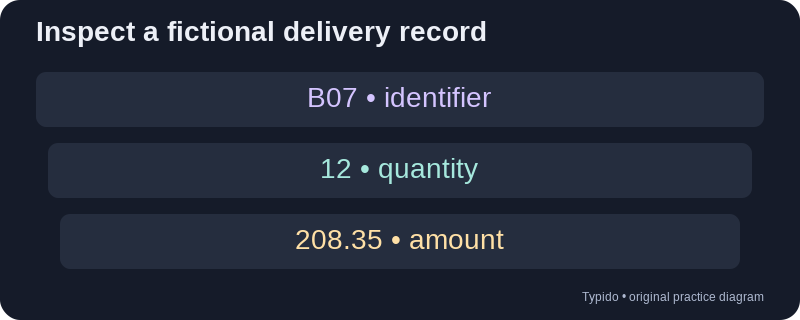
Inspect a fictional delivery record
| Step or observation | Explanation |
|---|---|
| Target | Box B07: 12 items, amount 208.35. |
| Digit check | Keep the zero in B07 and the digit order in 12. |
| Separator check | Keep the colon, comma, decimal point and final period. |
| Transfer | Change the values in the source before the next attempt. |
Practice dates as formats rather than isolated digits
A date exercise includes separators and an interpretation. The same written order can be read differently in different contexts, so label the intended format in your practice record. Copy the given text exactly instead of silently converting it to your preferred order. Then compare the day, month and year separately. This checks accuracy without implying that one regional convention is the correct choice for every reader or workplace.
Use invented examples such as “14 November 2026” or a clearly labeled day/month/year field. Add a short fictional sentence around the date so you also practice the transition back to letters. If the task feels difficult, first practice its digit group and separator, then restore the whole sentence. Do not use real birth dates, account references or appointment details from another person merely to supply practice material.
Keep amounts and decimal separators exact
Amounts need more than recognition of their digits. A missing separator or added zero changes the value, while different locales use different decimal and grouping conventions. State the format of the exercise and copy it consistently. This is keyboard practice, not financial advice or a request to process a real transaction. Use a blank document with fictional values and compare the original and entered text side by side.
Try an imaginary list containing “12.70”, “127.40” and “1,274.00”, explicitly using a dot as the decimal separator for this exercise. Then spell out a short sentence such as “The sample total is 127.40 units.” Check the decimal position, trailing digits and transition into the next word. Make a different set for a later attempt so the practice continues to involve reading and verification rather than recalling one fixed list.
Choose a fictional label such as “Batch 27-64 goes to Shelf A.” Copy the complete string and verify the separator against the target. Then try another original label using a different supplied separator if it matches your practice needs. Do not introduce every punctuation mark at once simply to make the exercise look advanced. Start with the character you actually need to find more reliably.
When a mark is wrong, check whether the issue was layout, key location or reading the target. Those observations suggest different next steps. A layout question belongs in the setup check. A key-location question can become an untimed movement drill. A reading mistake may call for slowing down and checking the source before typing. Keep these categories as personal notes rather than claiming they measure an underlying ability. Use a fresh fictional target after the follow-up so that the next attempt involves reading the string again rather than relying only on memory.
Connect capitals and punctuation to sentence rhythm
Practice a capital letter, a short phrase and its sentence ending together. Then add one comma or a question mark. If Shift remains pressed after the capital, isolate the release before adding more text. If you stop before every full stop, practice the last word and ending as one small group. A controlled transition is a clearer goal than simply trying to finish an entire paragraph faster.
Copy the original sentences below, inspect the capitals and punctuation, and then change the names and objects. Read the result aloud if that helps you notice a missing mark, but still compare the exact characters. A sentence that makes sense can differ from the source. When measuring a timed test afterward, use the same punctuation settings as the baseline; a lowercase-only passage does not test the same movements.
Nila, bring the green folder.
Is the next room ready?
The sample box holds 24 cards.
Use an error log that names the difference
Record an example of the intended and entered strings without including personal information. Label the difference: omitted separator, transposed digits, repeated character, wrong case or missing ending. Select one for the next short exercise. This prevents a large error count from becoming an unhelpful verdict about your whole typing ability. It also makes a later improvement easier to recognize when the same kind of text appears again.
Use Typido’s general test to compare WPM and attempted-input accuracy under consistent settings, and use focused Symbol practice for relevant keyboard attention. Advanced number-pad lessons require Pro, while the test and supported free modes remain available under their existing rules. A game score is not the same measure as accurate transcription of a record. Keep each result attached to its task and finish practice with a clear observation you can use next time.
Common questions
Should I hide punctuation to get a better WPM?
Use settings that match the skill you want to measure. Lowercase words can establish one baseline, but they do not measure the same movements as text with capitals, numbers and punctuation. Compare like with like.
Can I practice by copying customer records?
Use fictional records or an explicitly approved training environment. Real dates, references and amounts may reveal personal or confidential information and are unnecessary for learning the same key movements.
Sources and further reading
- Microsoft: Language and keyboard input layouts
Supports the input-layout setting fact cited in the opening section. The copying rules, fictional records and progression are original Typido exercises, not externally measured outcomes.