Understanding scores
How to read WPM and accuracy without misleading comparisons
Understand Typido’s correct-character WPM and attempted-input accuracy, with worked examples, correction rules and a checklist for comparing timed test results.
A typing result usually puts speed and accuracy next to each other, but the two numbers answer different questions. Speed describes a rate of text entry under a particular scoring rule. Accuracy describes a relationship between correct and total input attempts. Understanding those definitions helps you choose a useful practice task and explains why correcting a passage can affect the displayed values differently.
Use the scoring method of the actual test
Typing websites and assessments can use different definitions. Some show a gross rate, some subtract errors and some count correct characters in the current text. Correction rules also vary. Before comparing two results, read the method rather than assuming that the label “WPM” guarantees identical calculations. A difference between sites can reflect the task and scoring system as well as your keyboard performance.
Typido’s standard test calculates WPM from correct characters in the typed text, divides by five for a standardized word and divides by elapsed minutes. Spaces and punctuation are characters in that calculation. The displayed rate is rounded to a whole number. This is a platform scoring explanation, not a claim that every employment test, certification provider or other practice site uses the same method. Check the current instructions of any separate assessment.
Work through the time calculation
If you enter 200 correct characters in one minute, the calculation is 200 divided by five divided by one: 40 WPM. The same number of correct characters over two minutes gives 20 WPM. Over half a minute, 100 correct characters gives 40 WPM. These are arithmetic examples, not claims about real users or expected progress. Their purpose is to show why elapsed time belongs in the calculation.
The standardized word is not a count of dictionary words separated by spaces. A passage containing longer words can still be measured using characters divided by five. That convention makes the arithmetic clear, but it does not remove differences in text difficulty. Unfamiliar names, punctuation and capitalization can change the movements and reading demands. Keep those passage settings stable when comparing attempts rather than relying on the formula alone to make every text equivalent.
200 correct characters ÷ 5 ÷ 1 minute = 40 WPM
100 correct characters ÷ 5 ÷ 0.5 minute = 40 WPM
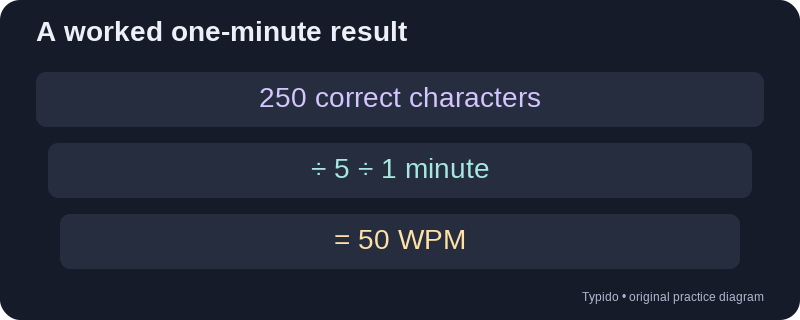
A worked one-minute result
| Step or observation | Explanation |
|---|---|
| Correct characters | 250, including correct spaces and punctuation. |
| Five-character words | 250 ÷ 5 = 50. |
| Elapsed minutes | 60 seconds ÷ 60 = 1. |
| WPM | 50 ÷ 1 = 50 WPM. Read attempted-input accuracy separately. |
Understand what attempted-input accuracy includes
In Typido’s test, accuracy is the percentage of character-input attempts that were correct. If 190 of 200 attempted character inputs were correct, the result is 95%. This describes the attempts, not only the appearance of the finished passage. An error can be corrected in the text while still remaining an incorrect attempt in the calculation. That distinction helps explain a result that looks surprising after careful editing.
Consider entering a wrong letter, deleting it and then entering the right one. The passage is now repaired, and its correct-character count can improve. The earlier wrong attempt still occurred. Do not treat Backspace as a way to reset the accuracy history or assume that a perfectly edited final line must show 100%. Use the percentage alongside a note about the actual recurring mistake so you can choose the movement to practice.
190 correct attempts ÷ 200 character-input attempts × 100 = 95% accuracyRead speed and control together
A faster attempt with lower accuracy is not automatically better for your current goal. It may show that you moved beyond a pace you can control on that text. An attempt at a similar speed with fewer repeated mistakes can be useful progress. Decide what you want to practice before looking at a personal-best label. A target such as “keep word boundaries accurate” provides a more specific task than simply demanding a higher number.
Use fictional comparison examples carefully. If an illustrative record shows 42 WPM at 89% accuracy followed by 39 WPM at 97%, the second attempt might be a better control exercise, but it is not proof of a particular person’s improvement. The conditions and longer record matter. Do not turn one pair of scores into a learning guarantee, an estimate of work productivity or a judgment about the learner’s general ability.
Keep duration, text and device comparable
Choose the same test duration and settings for a baseline and later review. A thirty-second burst is different from maintaining attention over five minutes. A lowercase common-word passage differs from a sentence with names, numbers and punctuation. A physical keyboard differs from a phone with autocorrection. Record those conditions, including any major display or keyboard change, before interpreting a score difference as a change in skill.
Avoid comparing an unfamiliar paragraph with a memorized one as though only your typing changed. Use fresh but similarly configured text and note any interruption. If a test is disrupted, record that fact rather than silently selecting a stronger attempt. The aim is an honest picture of a repeatable task. A small group of ordinary attempts provides more context than one result taken under unknown conditions on another website.
Turn the result into an exercise
After the test, name one repeated error or hesitation. Separate a key substitution from a missing space, an ordering problem or a difficult capital. Write a short original drill that contains the movement, inspect the result and then try a new sentence. A score has become useful when it directs the next action. Merely retaking the test several times can produce changing numbers without explaining what needs practice.
Keep game results separate from standard test WPM. A rhythm cue, completed drawing or campaign encounter includes the rules of that game and does not convert directly into a typing-test score. Typido’s normal practice result is also not a universal employment certificate. Use the learning library for targeted exercises, the course roadmap for unfamiliar keys and the blank record to keep comparable attempts with a brief observation about what you practiced.
Common questions
Does WPM count the number of ordinary words I typed?
Typido uses a standardized five-character word in its correct-character rate. Spaces and punctuation count as characters, and elapsed time is part of the calculation. Other assessments may define their result differently.
Can I compare a game score with my one-minute test?
Keep them separate. Game points and completions follow each activity’s rules. Use comparable timed tests, with consistent settings and devices, when you want to follow changes in standard WPM and attempted-input accuracy.