Accuracy exercises
Fix common typing errors with a small, specific drill
Find substitutions, reversed letters, spacing, and Shift mistakes. Turn one recurring error into a drill and check it with fresh text.
“Make fewer mistakes” is a goal, but it is not yet a practice instruction. A useful drill starts with a difference you can describe: the intended letter, the entered letter and the transition around it. Once that pattern is clear, you can isolate the movement, put it back into words and test it on fresh text. This guide shows how to turn common error categories into practical next steps.
Read the difference before repeating the passage
Compare a short piece of typed text with its source. Mark whether a character was replaced, omitted, repeated or entered in the wrong order. Keep the example small enough to inspect. An entire paragraph of highlighted errors can feel overwhelming and hide a pattern repeated across several words. Choose one recurring difference first, even if other mistakes remain. You can return to those after learning something useful about the selected movement.
Write the observation without judging yourself. “O appeared where I intended I after P” identifies a transition. “I cannot type” does not. Check whether the layout or starting position changed before assuming that the finger movement is unfamiliar. If the printed key labels and actual input disagree, correct the setup. A drill should address a real movement problem, not teach compensation for an accidental software-layout mismatch.
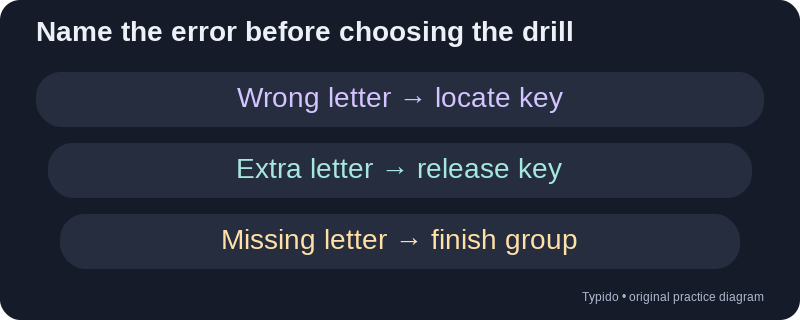
Name the error before choosing the drill
- form → from
- The letters are transposed: slow the R-to-O transition.
- cat → caat
- An extra A appeared: check the press and release.
- green → gree
- The final N is missing: check the word ending before Space.
Separate neighboring-key substitutions from hand displacement
A neighboring-key mistake may involve one uncertain reach or an entire hand shifted sideways. Find the home reference points and enter a few known keys. If all of them are displaced, reset the starting position. If only one transition is unreliable, alternate the intended key with a familiar neighbor slowly. Watch the result instead of increasing speed until the error is hard to observe.
For an I/O confusion, try short groups containing both letters, then put them in different words. Use “in”, “on”, “pin” and “pond” as a starting set, and follow with a new sentence. The point is to select the correct movement from the visible prompt. Do not memorize a long alternating sequence and assume that success on it guarantees accuracy in every word. Change the order while keeping the target distinction.
Slow the transition when letters swap places
When “the” becomes “teh,” the correct letters may be available but their order is unreliable at the current pace. Break the transition into a short group, type it deliberately and check it. Then restore the whole word. A pause can help you observe the order; it is not a failure that needs to be hidden immediately. Only increase the pace when you can still tell what each movement is doing.
Use the example below, then create another phrase with the same word in a different position. This prevents one memorized sentence from becoming the only successful context. If the swapped letters appear mostly when you hurry between words, include the preceding space or final letter in the drill. The cause may be the larger transition rather than the isolated word. Your error note should describe that surrounding context when it matters.
th he the
the red thread
Put the thread beside the pen.
Check releases and boundaries for repeated or missing characters
A repeated letter can result from pressing twice, holding the key or losing track of the source. Notice when it occurs before selecting a drill. Enter a short word, release fully and compare the output. If a hardware key repeats unexpectedly in multiple applications, investigate the device rather than assuming all repetitions are a practice issue. A simple keyboard fault can otherwise distort every exercise you try.
For missing spaces, practice short phrases with one clear boundary between words. For extra spaces, compare the boundary before continuing instead of correcting only at the end. Use familiar words so reading does not dominate the task. Then change the phrase to see whether the boundary remains dependable. Record spaces separately from letter substitutions; a single accuracy percentage does not tell you which of those movements needs attention.
Practice the press and release of Shift
A correct capital followed by an unintended capital suggests checking when Shift is released. Start with one capital and one lowercase letter. Then add a short word. If finding the Shift key makes the other hand lose its position, return to the anchors and practice the reach deliberately. Conventional QWERTY teaching often uses the opposite hand’s Shift key, but adapt the method to the keyboard and your actual access needs.
Try “Red”, “Blue” and “Green,” then place them in short sentences with different first words. Add a full stop only when the capital transition is clear. If you repeatedly forget the initial capital rather than mistype it, include a moment of reading the sentence boundary in the exercise. Remembering a formatting requirement and finding the key are different tasks, even though both can produce the same visible lowercase letter.
Test transfer and choose the next useful difficulty
After a few controlled examples, copy unfamiliar text containing the same movement. Compare the actual errors, not just the overall speed. If the original pattern improves while another becomes noticeable, decide whether to continue the first focus or move to the next one. A modest pace with fewer repeated errors may be more useful than an isolated faster attempt that reintroduces the same uncertainty.
Use comparable Typido tests when recording WPM and attempted-input accuracy. Editing the finished passage does not remove earlier incorrect attempts from that accuracy calculation. Keep your focused drill notes alongside the score so the percentage has context. A game can add variety, but its rules and points measure a different task. End the session with one specific observation and a fresh example to try later, rather than a vague requirement to repeat everything faster.
Common questions
Should I fix every error type in one session?
Choose one recurring pattern that you can describe and inspect. A smaller task makes it easier to identify what changed. Add complexity after the movement becomes more dependable on fresh words or sentences.
Why does accuracy stay below 100% after I correct the passage?
Typido counts earlier incorrect character-input attempts in attempted-input accuracy. Backspace can repair the final text and improve correct-character WPM without removing the history of those attempted mistakes.