Children and schools
Typing practice for children: short, supervised keyboard activities
Plan short, supervised guest typing activities using familiar words. Check device setup, privacy, and progress with age-appropriate tasks.
A child’s first keyboard session should make the task understandable. Finding a letter, recognizing a word and copying a sentence are different challenges, and a timer can make it hard to see which one needs help. An adult can begin with short, supervised activities using familiar text and specific feedback. This guide describes practice ideas, not developmental age norms or a promise that every child will learn at the same pace.
Start with access and privacy, not a leaderboard
Read Typido’s current Terms and Privacy pages before introducing a learner. The published public guidance directs under-18 learners to guest access rather than creating ordinary adult accounts. Do not use a false birth date or an adult’s shared password to bypass an age requirement. An adult should choose a suitable activity, understand what it displays and remain available to help. A public practice tool is not a substitute for a school’s safeguarding or data-handling process.
Use fictional names and simple original sentences in any separate practice document. Avoid entering a child’s address, school identifier or other personal details into exercise text. If a learner wants to keep a record, an adult can maintain a small offline note without posting the score publicly. Explain what is being recorded and why. A comparison with the learner’s own earlier task can provide feedback without turning the session into a public ranking.
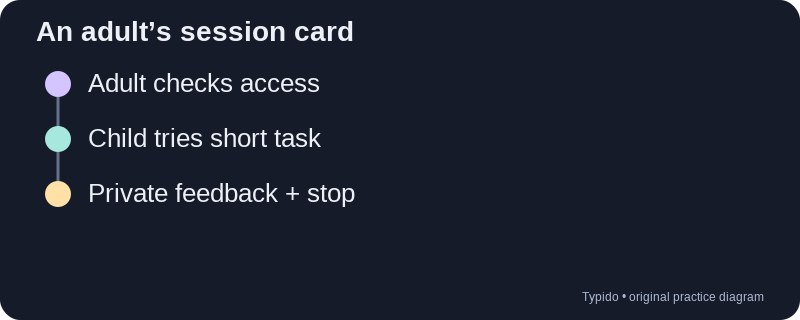
An adult’s session card
- Access. Use guest practice; children must not create accounts.
- Fit. Check that the learner can see the text and reach the selected keys.
- Task. Choose a short fictional word or key group together.
- Finish. Stop at the agreed point and name one specific success privately.
Check whether the device fits the activity
A keyboard lesson that shows finger positions assumes a physical keyboard. A touch screen involves different movement and may use autocorrection, so its score is not a direct comparison. Check that the learner can reach the keys and see the displayed text without an awkward stretch. Increase text size where helpful and choose a quiet enough setting to explain the instructions. A device or display problem should not be mistaken for a learning problem.
Before starting a game, preview its visuals, sounds and instructions yourself. Some Typido activities have action themes or faster scenes and may be unsuitable for a particular child or setting. Choose according to the learner, not the presence of the word “educational.” Turn sound down or off when appropriate. If the interaction becomes confusing, stop and use a simpler key-finding or copying task instead of insisting that the child finish the game.
Begin with recognition and a small success
Ask the learner to find one familiar letter, press it once and notice the result. Then add a second letter or a short known word. Keep the source text understandable so unfamiliar vocabulary does not dominate the exercise. If the learner is still learning to read the word, help with that part separately. The observation you need is whether the key can be located and entered, not whether the child can hurry through a passage.
For a child who recognizes the letters in “red” and “pen,” try those words individually, then the phrase “red pen.” Check the space together. Later change the phrase to another known combination. Praise a specific action such as finding the correct key or noticing a missing space, rather than labeling the child fast or slow. The next small task should follow from what you observed, not from a numerical age chart.
Use play with a clear purpose and a stopping point
A visual activity can make practice inviting, but the adult should still be able to explain its goal. Is the learner recognizing one letter, following a word prompt or keeping a rhythm? Choose one purpose and stop after a manageable attempt. If a score drops, check whether the rules were understood. Guessing under visual pressure is different from practicing an already familiar movement, so a more intense game is not automatically a better lesson.
Keep ordinary words in the session as well. After a letter activity, ask the learner to type a new short word containing that letter in a separate blank document. This checks whether the movement can be used outside the game. Do not compare points across games or promise that a certain score will produce a specific WPM improvement. The game’s rules determine its result, while a timed transcription test measures a different task.
Make feedback private, concrete and easy to use
Instead of correcting every detail at once, select one observation. “We need one space between these words” gives the learner something to do. “Your accuracy is bad” does not. Show the difference between the source and typed text, correct it together and try a different phrase using the same movement. A repeated mistake can be useful information about the next activity, provided the feedback remains about the task rather than the learner’s ability.
If the child becomes tired, frustrated or uncomfortable, end or change the activity. There is no requirement to complete a predetermined number of minutes. Let the next session begin with something recognizable before adding a new challenge. Do not make claims about attention disorders, motor development or health from a practice score. Those questions require appropriate professional judgment and cannot be answered by one online typing attempt.
Review progress through comparable tasks
An adult can keep a short note such as “found F and J independently” or “copied a familiar three-word phrase with spaces.” Later, repeat a similar task with different text. This is more informative than comparing a child’s first attempt with an experienced adult’s best score. If you use a timed test, keep the duration and text settings stable and explain that the result describes that one attempt, not a personal grade.
Discuss the next step with the learner: another familiar key group, a new word or a short lesson. Keep the choice small and understandable. Typido’s free Beginner path and guest test can support suitable supervised practice, while paid lessons and game levels follow their existing access rules. No classroom administration, child account system or learning guarantee is implied by this guide. Review the actual product and your organization’s requirements before adopting it.
Common questions
What WPM should a child reach?
Start with understandable tasks and compare similar attempts privately. Reading familiarity, device setup and key recognition can affect the result as well as typing movement.
Should I create an account for an under-18 learner?
Follow the current published age and privacy rules. Typido’s public guidance directs under-18 learners to guest access rather than ordinary adult accounts. Do not bypass age requirements with false details or shared credentials.