Learning the keyboard
Touch typing for beginners: a practical first-week approach
Start touch typing with home-row anchors, small key groups, and fresh sentences. Review mistakes and choose the next beginner lesson.
Touch typing means finding keys through learned movement rather than searching visually for every character. You can begin without being fast and without covering the keyboard. The first useful goal is dependable control of a small set of keys. This approach combines a clear starting position, short exercises and unfamiliar sentences so you can notice whether a movement has become easier, rather than merely memorizing a passage.
Prepare a keyboard you can use consistently
Use a physical keyboard for finger-placement practice. Check its layout before following any diagram: this guide describes a standard US QWERTY arrangement. Other national layouts and alternative arrangements can put letters or symbols elsewhere. Open a blank document and verify that the keys produce the expected characters. If the printed label and the entered character differ, check the operating system’s input layout instead of repeatedly drilling the wrong movement.
Place the keyboard where you can reach it without holding your shoulders forward. Make the exercise text large enough to read comfortably. Remove distractions that make you lose your place, and choose a short session you can review attentively. If a particular finger assignment is unsuitable for you, adapt it or use appropriate accessibility support. The purpose is comfortable, reliable entry, not forcing every learner to copy the same hand posture.
Learn two anchors before a whole keyboard
On many physical keyboards, F and J have tactile marks. Find those marks with your index fingers, then notice the neighboring home-row keys. In a conventional QWERTY starting position, the left hand rests near A, S, D and F; the right rests near J, K, L and semicolon. Let the thumbs rest near Space. Touch the keys lightly rather than pressing the whole row down together.
Lift your hands briefly and find F and J again. Then type a few alternating keys, pause and check the result. You are practicing returning to a known position. A deliberate look at the keyboard can help you correct a mistaken placement; avoid turning “never look down” into a rule that makes you repeat an error. Gradually use the tactile anchors more often as you become familiar with the position.
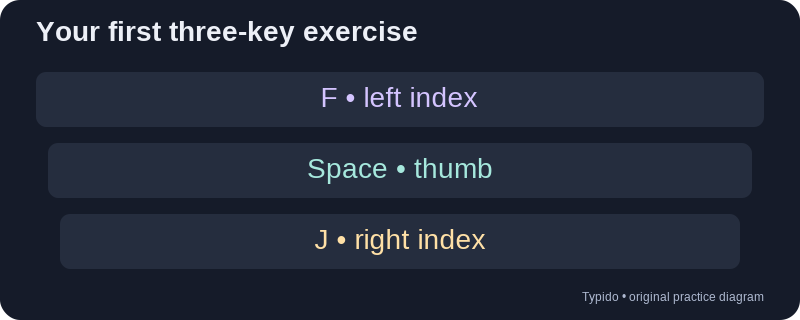
Your first three-key exercise
- Find F and J. Feel the raised marks, then look back at the text.
- Add a space. Copy “fj jf” slowly, leaving exactly one space.
- Return to the anchors. Pause between groups until the return feels familiar.
Practice a small group and then use it
Choose only a few keys at first. Type a short alternating pattern, release each key fully and check whether the intended character appears. Then use the same keys in a small word or phrase. Patterns isolate a movement, while words require you to connect movements. Neither needs a timer. If a pattern is repeatedly wrong, shorten it until you can identify exactly where your hand leaves the intended position.
For an F/J starting exercise, try the pattern below in a blank document. Add a word only when its keys are familiar. Do not spend an entire session copying an easy pattern that you can already perform. Introduce a small new reach, return to the anchor and combine it with an old movement. Typido’s free Beginner lessons provide a guided route through key groups; the public course roadmap explains the wider progression.
f j fj jf
add a flask
a sad lad
Read the next group without racing ahead
A beginner often alternates between staring at one letter and trying to enter a whole sentence too quickly. Read a short group, type it at a controlled pace and check the space before the next group. You do not need to hold a long passage in memory. If you repeatedly skip a word, shorten the exercise or place the source text closer to the place where you are typing.
When a familiar sentence becomes effortless, change it. Replace a name, reorder the words or choose another sentence using the same keys. A learned passage can feel fast because you remember its sequence; a new sentence checks whether you can find the keys in a different order. Keep the language and vocabulary understandable so the task remains about keyboard learning rather than guessing unfamiliar words.
Treat mistakes as directions for the next drill
After an exercise, choose one repeated problem. A neighboring-key substitution suggests checking the reach; letters in the wrong order suggest slowing the transition; a missing space suggests practicing the boundary between words. Write down the pattern in plain language. “I hit R instead of F after reaching upward” is more useful than “I am bad at typing.” Return to a shorter example that contains that exact movement.
Correct the exercise carefully, then try a fresh example. Backspace is an editing tool, but it should not become a reason to ignore what caused the original mistake. In Typido’s test, corrected text and attempted-input accuracy are measured differently, so a repaired passage does not erase earlier incorrect attempts. Read the scoring explanation before using the percentage to compare sessions. Keep early practice focused on control rather than a personal-best chase.
Build a flexible first week
Use the first session to find the anchors and learn a small key group. In later sessions, combine known keys with one new reach and finish with a fresh phrase. Add spaces and capitals when the relevant movements are ready. These are suggested steps, not a fixed timetable: you may spend several sessions on one group or move forward sooner if it already feels familiar. Shorten the session when attention or comfort declines.
At the end of the week, take a short typing test if you want a baseline. Record its duration, settings, WPM and accuracy, then note one recurring hesitation. Continue with the lesson that addresses that hesitation. A game can add variety, but game points are not equivalent to prose WPM. You have made useful progress when you can recognize and control more movements on fresh text, even before a large speed change appears.
Common questions
Must I use all ten fingers immediately?
No. Learn a manageable group of movements and expand gradually. Adapt the approach to your hands, keyboard and accessibility needs instead of forcing a prescribed position that is unsuitable for you.
How long will learning take?
There is no guaranteed schedule. Prior experience, practice conditions and the task all matter. Use repeatable exercises and new sentences to judge what is becoming more dependable, rather than expecting a fixed daily WPM increase.