Children and schools
A classroom typing lesson plan with private, useful feedback
Plan a supervised typing lesson with device checks, familiar text, differentiated tasks, and an offline progress record.
A classroom typing lesson needs a learning objective before it needs a score. Learners may differ in reading experience, keyboard familiarity and access needs, even when they share an age group. A small pilot helps a teacher discover those differences without committing the whole class to a competitive speed test. This plan uses supervised guest activities and offline observations; it does not assume Typido provides a class-management or student-reporting system.
Choose one observable objective
Write the objective as an action you can see: locate a small group of keys, enter spaces between familiar words or use a capital at the start of a sentence. “Improve typing” is too broad to guide a short lesson. Match the text to the learners’ reading ability so vocabulary does not become an unplanned assessment. Prepare an easier and a harder version of the same movement rather than assigning everyone an identical speed target.
For a spacing lesson, one learner might copy two familiar words, another a short sentence and another a new sentence with punctuation. All three can work on word boundaries. Explain the objective before opening the activity and decide what observation would show that it is becoming more dependable. A quiet note about the task can be more useful than a large scoreboard that does not tell learners what to practice next.
Run a device and policy pilot first
Test the actual school browser, physical keyboard, network and sound settings before the lesson. Check whether the keyboard layout matches the labels and whether the display is readable. Open the activity as a guest and complete a short attempt yourself. Make sure you can return to the instructions and stop any audio. A working page on your personal laptop is not evidence that the managed classroom environment permits every required resource.
Review the current Terms, Privacy and age guidance with the appropriate school decision-maker. Under-18 learners should follow Typido’s published guest-access guidance rather than create ordinary adult accounts. Do not upload a class list, reuse one personal account across the room or imply that a public practice page has been approved for every school context. Keep the pilot small until the organization has addressed its own safeguarding, accessibility and data requirements.
Model a mistake and a useful correction
Demonstrate a short original phrase on a shared display. Enter it slowly, deliberately omit one space and compare the result with the source. Ask what changed and what movement would fix it. The purpose is to make error review normal and specific. Avoid using a real learner’s mistake as an uninvited public example. A fictional example lets the class discuss the task without ranking or embarrassing someone.
Show that correcting a passage and measuring accuracy are related but different. In Typido’s test, an incorrect character attempt remains part of attempted-input accuracy even if the final text is repaired. Explain this only to the level needed for the activity. Younger or newer learners may simply need to see how to compare two strings. Older learners can discuss why a clean finished paragraph does not necessarily mean every input attempt was correct.
Structure a short, flexible practice sequence
Begin with a familiar key or phrase so learners understand the interaction. Next, introduce the chosen movement in a small example. Follow it with a fresh phrase that uses the same movement in a different order. End with a review question such as “Which space did you need to add?” This sequence can be shortened or extended. It is a planning example, not a claim that one fixed lesson length suits every class.
Have an alternative ready for a learner whose reading, device or access needs make the main activity unsuitable. A teacher-led key-finding task or a separate plain-text exercise may be more appropriate. If a game is used, preview its theme and rules and explain its connection to the objective. Action visuals, timing pressure and sound may distract from a basic spacing lesson. Variety is useful when it supports the task rather than replacing it.
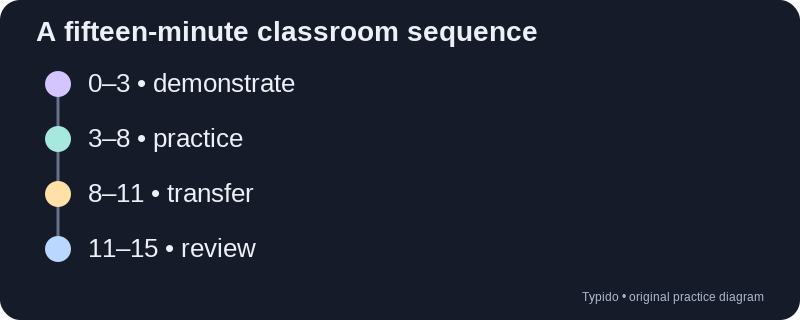
A fifteen-minute classroom sequence
- Minutes 0–3. Demonstrate the target movement and one correction.
- Minutes 3–8. Practice a small key group or fictional sentence.
- Minutes 8–11. Use fresh text to see whether the movement carries over.
- Minutes 11–15. Write one private observation and choose the next activity.
Record observations without collecting unnecessary identifiers
Use the school’s approved process for any student information. For a simple practice pilot, an offline note about a movement may be sufficient: “needs a reminder before Space” or “found the anchors again after a reach.” Do not put names, school identifiers or personal details into public exercise text. If you choose to record numerical results, document the task, settings and purpose, and keep the record as private as the school requires.
Avoid comparing unlike results. A short familiar-word exercise and a longer unfamiliar paragraph measure different demands. A game’s points do not convert into a class WPM ranking. Explain to learners which observation will guide their next task and give them a chance to describe where they hesitated. Their description can reveal an unreadable prompt or misunderstood instruction that a score alone would miss.
Use the review to decide what happens next
After the pilot, separate technical problems from learning needs. A blocked resource, mismatched keyboard layout or unreadable display calls for a setup correction. Repeated missing spaces call for a smaller boundary exercise. Learners already controlling the movement can try a new sentence or add a capital. This keeps the next lesson connected to observed work instead of repeating the same timed test and hoping the number improves.
Use the public course roadmap and learning library for follow-up ideas, and check Free/Pro access before assigning an activity. Beginner lessons and the guest test are available under their current free rules; Intermediate, Advanced and some game content require Pro. Do not promise automatic class reports, certificates or institutional features that have not been verified. A successful pilot produces a clear learning decision and a workable device setup, not merely a list of scores.
Common questions
Must the class compete for the highest WPM?
No. Choose an objective suited to the learners and keep feedback private and specific. Comparable personal attempts can inform the next lesson without turning different reading and keyboard experiences into one public ranking.
Does this guide establish school approval?
No. The school must review its own policy, accessibility, safeguarding and data needs. This is an original planning example for supervised practice, not a claim of institutional certification or class-management functionality.