Numbers and accuracy
Number pad vs number row: practice accurate numeric entry
Choose a numeric-entry method for your actual task, practice identifiers and decimals, and track omissions, substitutions and transposed digits separately.
Numeric typing deserves a different exercise from copying a prose paragraph. A reference code may mix letters and digits; a column of amounts may involve repeated decimal entry; a date may include separators. The useful choice between a number pad and the number row depends on those tasks and the equipment available. This guide offers original drills and a comparison record. It does not convert numeric entry into an invented universal WPM benchmark or promise that one method is fastest for everyone.
Identify the exact numeric task before choosing a method
Write down what you normally enter: mixed identifiers, amounts, dates, telephone-like strings or mostly digits. Use invented examples rather than real records. Notice whether you frequently return to letters or move through repeated fields. This description should be specific enough to guide a practice exercise. “Type numbers faster” is broad; “enter a fictional reference code, amount and date without switching fields accidentally” gives you a sequence you can rehearse and a finished record you can inspect.
Check the keyboard you will actually use. Some compact models place numeric functions on a secondary layer; Microsoft documents an Fn-based embedded numeric layout for applicable keyboards. That is a model-specific feature, not a shortcut to assume on every laptop. Consult your own device instructions and confirm the current mode in a harmless blank document. If the input does not match the printed label, resolve the layout or mode before interpreting it as a typing-skill problem. [Microsoft: Fn, alternate command keys and embedded numeric layout]
Build a careful number-row drill
Start with short groups that do not require remembering a long sequence. Copy one group, check it and return to your usual letter position. Choose a comfortable movement pattern rather than stretching to finish an arbitrary timer. Add a different group on the next line. Look for repeated omissions or a tendency to reach for the neighboring digit. The immediate objective is a dependable movement from your normal typing position, followed by an accurate return to the next part of the task.
Then place the digits inside a fictional mixed identifier such as AB-6027 or room K418. Copy the full string, including capitals and punctuation. Change the example after several attempts so that you must still read the source. If letters are correct but the hyphen is repeatedly missing, practice the transition around the hyphen instead of repeating unrelated number strings. Record the exact error. A general accuracy percentage can be useful, but a specific missed separator tells you more about what to rehearse.
2067 4180 9352
AB-6027  K418  N-9305
Check each copied group before starting another.
Learn the pad’s positions before adding a timer
If you use a separate numeric pad, inspect its actual arrangement first. Locate the digits, decimal key, Enter and any controls that change input behavior. Find a repeatable resting position and practice moving from it to a nearby key. A raised marker, if your board has one, can be a useful reference. Do not assume that a telephone keypad, a calculator-like display and your keyboard pad place every digit in the same position; verify the board in front of you.
Practice one small movement group, check it and pause. Next, copy short unfamiliar amounts with the decimal marker shown in the source. Keep the exercise in a plain document until you know what the keys produce. If your intended application uses a different decimal convention, verify its settings separately before entering important data. A typing drill should not silently teach you to replace the source’s punctuation. The finished numeric string must match the task, not merely resemble a familiar amount.
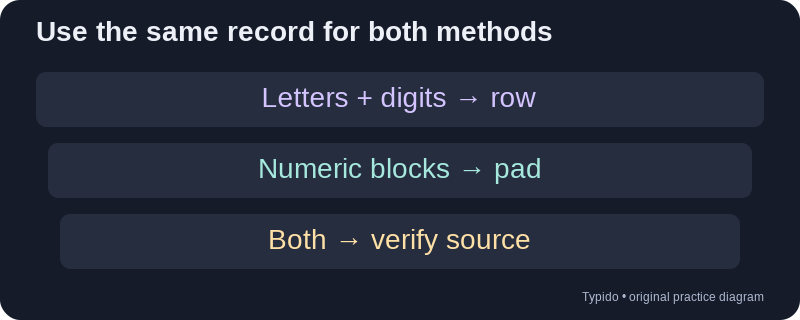
Use the same record for both methods
- Number row
- Enter “ID A07, amount 208.35” and note the letter-to-digit transitions.
- Number pad
- Copy the same record and check Num Lock and the decimal key.
- Review
- Compare wrong digits and wrong fields before comparing completion time.
Review the kinds of errors that affect a record
Use a simple checking pass with separate labels for substitution, omission, extra input, transposition and field placement. For example, replacing 6 with 9 differs from reversing the middle digits of a reference. Writing a correct amount into the wrong field is another kind of failure. These are fictional practice examples, not a statistical taxonomy measured on Typido users. The labels help you choose a drill that addresses the actual mistake instead of treating every inaccurate record as the same problem.
Keep the source beside the result while checking. Compare identifiers as strings rather than assuming their digits form a quantity. Preserve leading zeros when they appear in the source. For amounts, inspect the digits and decimal position separately. For dates, follow the stated format rather than guessing a regional convention. Mark the first place where the record differs, correct it and review the whole field again. Once the sequence feels dependable, try fresh examples with the same structure.
Compare the row and pad using the same work sample
Prepare two small sets of fictional records with similar structure. Use one method for the first set and the other for the next, noting the order. Keep the field order and checking procedure consistent. Record completed, correct records alongside any time observation. Do not compare a familiar digit pattern on one method with a complicated new mixed code on the other and attribute the difference entirely to hardware. Repeat on another occasion with the method order reversed if the decision matters to you.
Describe a useful result in terms of the task. Perhaps the pad helped with repeated amounts, while the row made mixed identifiers easier to enter without moving away from letters. Your own record can support that practical choice without establishing a population average. For ordinary prose, keep a separate WPM baseline with consistent settings. For numeric practice, retain the record structure and errors so that a later comparison still describes the same kind of work.
Turn a numeric error into the next practice step
Choose one recurring issue and create a small exercise around it. For a missed decimal, alternate fictional whole-number and decimal examples while checking the marker deliberately. For a transposition, copy a new short code and compare its order before continuing. For the wrong field, rehearse the field sequence slowly with a blank form you control. Avoid using production systems to create practice records that could be mistaken for real entries. Keep personal, customer, financial and medical information out of public typing exercises.
End the exercise by copying a fresh record that contains the same kind of transition. Write down whether the error reappeared and what conditions you used. Continue with the chosen method long enough to learn its movements before judging it against a familiar one. You can change the practice plan if the task changes, such as moving from amounts to mixed identifiers. The goal is reliable transfer to the work you actually need, not a number-pad score with no defined method or accuracy rule.
Common questions
Is number-pad speed directly comparable with prose WPM?
Keep the measures separate unless a specific assessment defines a comparable method. Record the numeric task, field structure, accuracy rule and input method. A correct identifier or amount is not described fully by a prose speed score.
Should I use real work records for realistic practice?
Use fictional records or an explicitly approved training environment. You can reproduce a format without exposing actual customer details, financial records or confidential identifiers.